
Shrink Pic is a program that automatically resizes photos sent by email or uploaded to the web. it catches file read operations in other programs and replaces large photos with smaller versions. It’s is a C++ program, written using the excellent wxWidgets library.
We’ve recently localized it to Spanish, French, German and Japanese. This article tells the story of how Shrink Pic went multilingual.
1) Placing all strings in a resource file
A resource file is a fancy name for a file which holds some data for the program. In our case, the resource file contains all the texts that appear in Shrink Pic. Before this was done, texts appeared within the code. For example, the program’s title was set with this line of text:
SetTitle(_T("Shrink pic (running)"));
When text is found inside the program’s code, it’s difficult to translate a program. The reason is, changes must be made in many places making the localized program much different than the original one.
The seperate between the code and texts, we used the gettext framework. This makes localization as easy as it can be. Here’s the change in the line that sets the program’s title:
SetTitle(_("Shrink pic (running)"));
Did you notice the difference?
The first call uses _T(text) and the second call uses _(text). The _T() function places a Unicode string in the program. The _() function places a text which goes through gettext.
What gettext does is check if a certain string has translation to another language. If it does, it returns the translation. Otherwise, it returns the original string. So, for example, when Shrink Pic is running in Spanish and we call it with “Shrink pic (running)“, it will return “Shrink pic (activo)“.
From that point on, it’s a smooth ride. All the translation is done outside of the program. We’ll get to it in a minute.
2) Collecting the strings that need translation
So now, our program’s texts all pass through gettext, which provides their translation during run-time (when Shrink Pic executes). The next step is to provide the translations.
Gettext uses files called .po (portable object) and .mo (machine object). The .po files are actually text files that contain strings and their translation. The .mo files contain the same data but are formatted so that programs can read them faster (without parsing).
The process for providing the translation is:
- Create a .po (or .pot – portable object template) file with all the program’s strings.
- Translate all strings in that file to each language, keeping each language translation in a different .po file.
- Convert from .po to .mo (a program does that for us).
- Load the .mo files to our program (Shrink Pic) so that it can use the translations when it runs.
Much of the work required for this is done by a free program called poedit. It can scan the program and create the .po file that contains all the texts that appear in it, allows translators to translate the texts and also creates the .mo files (automatically).
Creating the .po file is a breeze with poedit. This is what you need to do (all the explanations here refer to poedit):
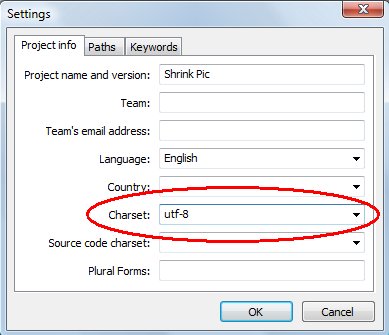
New poedit catalog
File->New catalog…
You will need to enter some information about your program. Most of it is optional. Do make sure you enter the program’s name and the character encoding as ‘utf-8‘.
Next, click on the Paths tab and enter the path to your program.
Last, click on Catalog->Update from source.
You’re done. The .po file should now contain all the texts in your application.
3) Translating the resource file
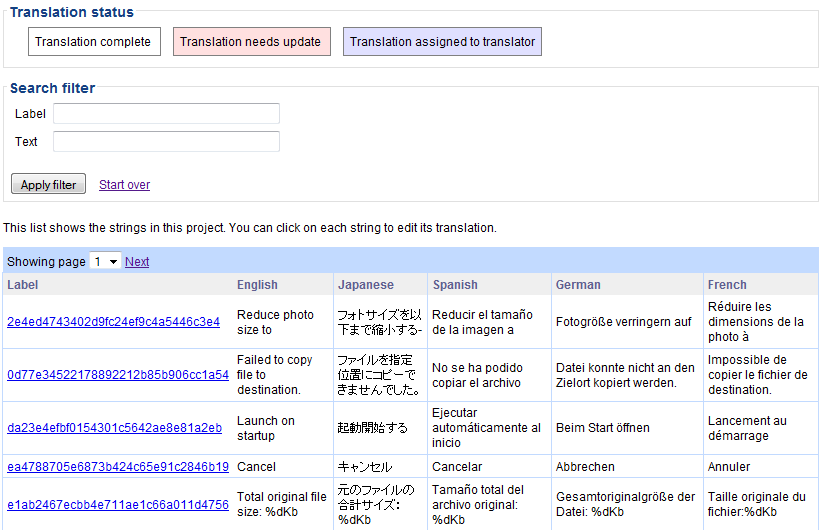
Translation Panel in ICanLocalize
If you know translators, just send them the .po file. They’ll translate it using poedit and return the translated file to you. We took a slightly different path for the translation work.
To translate Shrink Pic, we created an account at ICanLocalize. It’s a translation service for small businesses, like us. With that, we managed to do all our translation jobs at one place, without having to deal with the translators or any technical issues (like incorrect character encodings).
Next, we created a Text resource translation project. We indicated that we’re translating from English to Spanish, French, German and Japanese and uploaded our .po file.
When the translation was done, we got an email and downloaded each of the .po files.
4) Oops – we forgot some strings…
When we built the translated Shrink Pic, we noticed that some texts are still in English. We’ve forgotten to change the _t() calls to _() calls in some places (they do look rather similar). No problema! We fixed the code and used poedit once more to recreate the .po files. Then, we uploaded the new version for translation (in the ICanLocalize project). This time, the translators only got the new strings and translated them. The completed translations came back the same day and the fully localized Shrink Pic is now online, available to download.